BENVENUTO!

Tacview - aggiornamenti, dubbi, richieste

Segnalo l'aggiornamento alla versione 1.4

Ecco il link sul Forum ED

http://forums.eagle.ru/showthread.php?t=151353

Tacview 1.4 and its long awaited online debriefing is available!

After a long period of debugging and tweaking, it is time to release Tacview 1.4 so you can now enjoy the promised online debriefing feature.

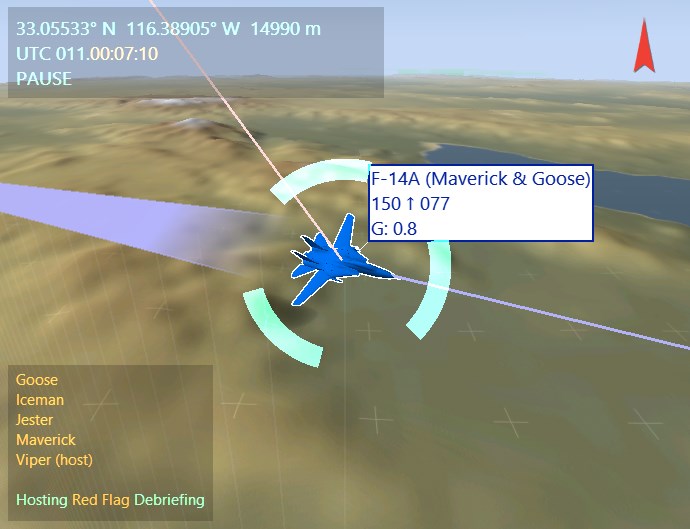
Now registered users can connect all together to enjoy a debriefing provided by their instructor. Time, point-of-view, altitude restrictions and other settings will be in sync on all computers. The strategic view and charts will be visible for everyone during the debriefing. Everyone can SHIFT+CLICK an object in the 3D view to highlight a specific action. And don’t forget to press ALT+ENTER to enter fullscreen mode to fully enjoy the debriefing while sipping your favorite drink

Please note that a professional license is required to host a session and at least a home license is required to join a session. Obviously, all these features are available during the trial period.

In the following updates, the host will also be able to give control to any client with a Professional license and clients may be able to temporarily keep control of their own point of view.

Now I can focus on the other long awaited feature: The real-time flight analysis which will be available to most flight simulators and real-life devices like DCS World, FSX and X-Plane just to name a few.

Enjoy!
Vyrtuoz

http://www.strasoftware.com/download/tacview
659387599753256960.jpg


FEATURES & CHANGES•Added the online debriefing (requires Professional edition for instructors and Home for trainees)
•Added support for Garmin G1000 Flight Deck CSV files
•Added support for KML flight recordings exported from ForeFlight & FlightAware
•Added support for MGRS coordinates system
•Added support for DCS World 1.5
•You can now insert bookmarks in the events list and timeline
•You can now share links containing the current view and selection with your friends
•You can now Shift+Click to attract viewers' attention to a specific object in the 3D view
•Added AGL (above ground level altitude) to charts, labels & walls
•Added roll and pitch angles to the telemetry windows
•It is now possible to display ATC styles labels for aircrafts (using selected unit system)
•A vertical speed arrow is now displayed in the AGL telemetry label
•Aircraft position and rotation can now be exported from telemetry charts
•You can now define AGL & ASL restrictions which trigger alarms
•When in cockpit or external view the coordinates of the first or secondary object are displayed in place of observer's ones
•Clicking the compass now returns to a top view with the north up
•Labels size and auto-scale can now be automatically or manually adjusted to match screen resolution
•New versions of Tacview will be installed on previously installed versions
•Charts are now automatically scrolling to keep the time cursor in view
•Improved fonts used in the 3D view and charts
•Added preliminary support for RTL languages (like Hebrew)
•Lower importance objects labels are now slightly faded
•Playback speed can now be increased up to x64
•Added support for Windows 10
•Added DA40 Diamond Star & Dassault Rafale 3D mesh
•Added some real world airports to the map
•License agreement is now less intrusive
•Terrain, static objects, and 3D models can now be stored in %ProgramData%\Tacview\Data\ or %APPDATA%\Tacview\Data\
•Time slider is now moving smoothly during playing back
•Added a link to Tacview Facebook page in the status bar

FIXES•Bookmarks text were not saved in compressed binary acmi files
•Dogfight mode was not taken into account while switching to satellite view
•Unsupported acmi file formats were not properly reported as such since version 1.3.3
•Fixed a rare crash when some data was displayed on distance charts
•Multimedia keyboard keys like play or rewind were not working anymore
 
Domenica o al massimo lunedì, viene rilasciata la versione 1.4.1 beta che avrà anche il supporto per la lingua Italiana.

Vi chiedo di esser spietati e di criticare ogni singola parola che vedete nel software, dall'eula alle scritte del briefing ecc...

E' una prima versione ed è modificabile secondo il nostro piacere in attinenza con la versione in inglese.

Vi ringraziamo in anticipo sia io che Frantz Raia.
 
Gaanalma ha scritto:
Domenica o al massimo lunedì, viene rilasciata la versione 1.4.1 beta che avrà anche il supporto per la lingua Italiana.

Vi chiedo di esser spietati e di criticare ogni singola parola che vedete nel software, dall'eula alle scritte del briefing ecc...

E' una prima versione ed è modificabile secondo il nostro piacere in attinenza con la versione in inglese.

Vi ringraziamo in anticipo sia io che Frantz Raia.

Grande Gaana! Complimenti!!!!!!
 
Chiedevo se conviene acquistare la versione Home o va bene anche la versione free?
 
Vyrtuoz;2599225 ha scritto:
Tacview 1.4.1 is now available!

http://www.strasoftware.com/download/tacview

It offers an even better online debriefing experience and a better support for DCS World 2.0.
Now you can use a professional grade 5mW laser pointer to show to your team mates where they must focus their attention! You can also temporarily give control to one of your fellow instructors so they can share their point of view with the audience.

And the performance issue with some Radeon graphic cards has finally been fixed!

Now, I can focus my work on Tacview 2.0 and the next intermediate release 1.5. Which will feature improved telemetry and the long awaited real time flight analysis!

And for those who want to know more about the past and future of Tacview, do not forget to listen the exclusive interview in the last 476th Podcast from Dojo!

674305307028385792.png

https://t.co/DLC8r0ml8N

Enjoy!
Vyrtuoz

665174067784224768.jpg


FEATURES & CHANGES
  • The online debriefing host can now temporarily give control to a client
  • A laser pointer is now displayed when holding SHIFT during the online debriefing
  • Screen space visible by all peers is now highlighted during online debriefing
  • Italian translation by Diego Festari
  • The export script is now automatically installed in all DCS.* folders (inluding DCS.openalpha)
  • DTC files stored in \Data\Static Objects\ folders are now automatically loaded (relatively to the last active theater)
  • Added support for BMS 4.33 tilesets in Data-Falcon4Theaters.xml
  • Updated Korea to BMS 4.33 terrain
  • Updated Balkans to BMS 4.33 version
  • Updated Israel to v1.0 for BMS 4.33
  • Updated Aegean to version 1.6
  • Updated Nevada terrain with DCS World open alpha data
  • Integrated ITO Range 602 from Uri Ben-Avraham for BMS 4.33
  • Added an option to open the current flight recording folder in the File Explorer
  • Improved support of csv files with trailing tabs

FIXES
  • Fixed performance issues about terrain streaming with some Radeon graphic cards
  • DTC files drag & drop on Tacview window was not working anymore
  • It is now possible to display a 3D mesh for objects not in Tacview database
  • DCS World export script was not working in some rare cases
  • Charts were not properly synchronized during online debriefings using different files
  • It was not possible to open some files by dropping their icon on Tacview icon
  • It was not possible to copy/paste a shortcut when no data was loaded
  • CTRL+C was creating a bookmark while moving the free camera
 
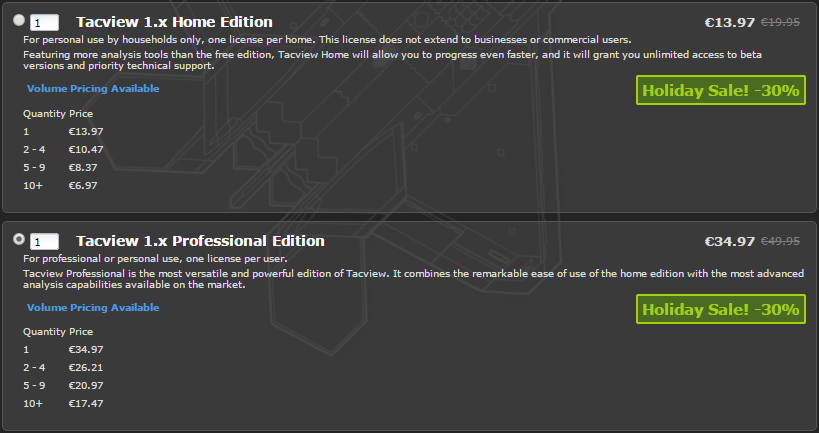
A lot of cool things are going to be released in Tacview during next year. Meanwhile here is a good news for this end of year:

The Holiday sale has begun: From Dec 19th to Jan 3th, 30% off on all Tacview licenses including group buy!

Your squadron misses you during the online debriefings? It’s the occasion for you to join them!

If you want to upgrade from Home to Professional, just send me an email with your product key and I will return you a special link.

http://www.strasoftware.com/buy/tacview

TacviewHolidaySale.png
 
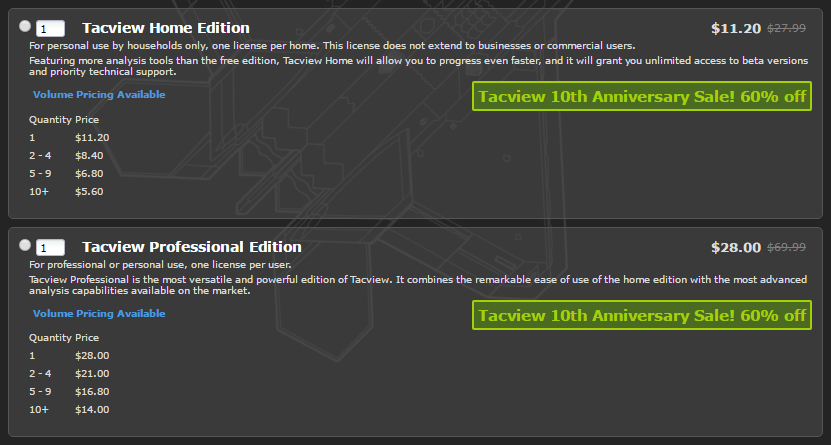
Tacview 10th Anniversary Sale: 60% off pro and home licenses!

http://www.strasoftware.com/buy/tacview

It’s been already 10 years since the first public version of Tacview has been released!

Because this success is mainly due to your incredible support and feedback, let’s celebrate with an exceptional three-weeks sale from Jun 27th to Jul 18th: 60% off Home and Professional licenses.

Do not forget that you can also do a group order for an additional discount. This is the perfect occasion for your whole squadron to enjoy the online debriefing!

If you want to upgrade you Home edition to the Professional one, please send me an email with your name and current product key. I will return you a coupon to buy the upgrade at the reduced price.

747515513048182784.png


Per chi fosse interessato a fare un acquisto in comitiva, il risparmio è consistente.
 
Ci sto
 
ci sto, premiamo il lavoro che ci sta dietro risparmiando soldini
 
Salve a tutti, domani mi scade la versione di prova Tacview, come dovrò comportarmi poi? devo per forza acquistare la versione a pagamento o esiste un escamotage per poter sfruttare ancora la versione di prova e magari comprarla in seguito, sperando che a giugno ci sia qualche offerta?

saluti
 
Io non ho fatto nulla e, in pratica, non è cambiato nulla. Non mi ricordo la mia versione ma ti consiglierei di aspttate e vedere che succede.
 
alcune funzionalità secondarie spariscono (come l'indicazione di chi sta lockando chi), ma tutto il resto rimane (almeno la parte che interessa a noi)
 
Tacview 1.6.2 is now available to everyone!

Download: http://tacview.net/download

This update brings numerous fixes, plus the following improvements:

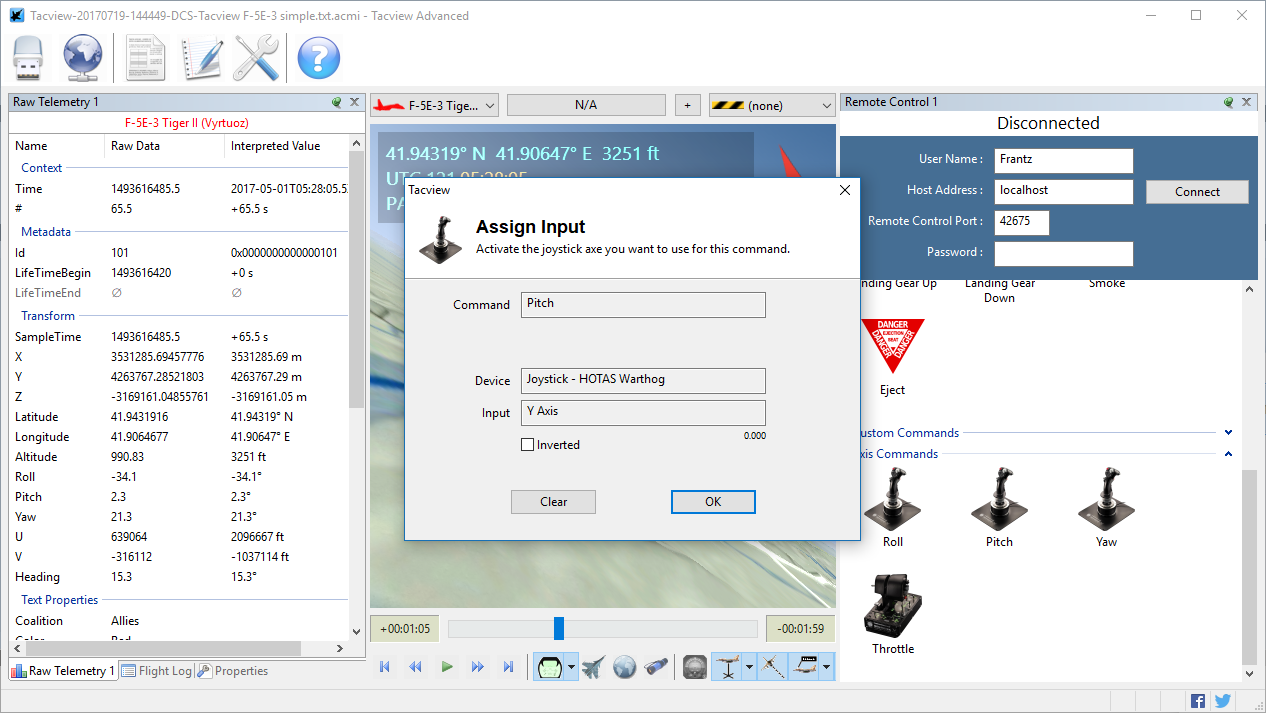
The instructors are going to like the upgraded remote controls: You can now assign custom keyboard and joystick controls to remotely controls and assist the aircraft of your trainees flying in DCS World, FSX, Prepar3D and X-Plane. Remote controls can also be used to trigger special features (flags) in your DCS World mission.

The DCS World exporter has been improved to fully record and playback network flights when playing back the corresponding track files in DCS World. The next update will bring an improved anti-cheat system which will enable you to playback any network flight as long as you wait enough time before reviewing it in Tacview.

New command line options have been introduced so administrators can silently and remotely install and update Tacview using the command line.

888152149225594880.png


FEATURES & CHANGES

• Added support for custom and animated explosions and smoke radius
• Added support for AGL altitude advanced telemetry data
• Remote controls will now automatically attempt to re-establish the connection with the host sim
• Remote controls are now displaying big icons easier to use with touch screens
• It is now possible to use keyboard and joystick inputs to remote control simulators
• Added remote control command to toggle wing tip smoke
• Eject and respawn now requires a double click in the remote controls
• Added /ConnectRealTimeTelemetry command line option to auto connect real-time telemetry at startup
• Added /ConnectRemoteControl[:*] command line option to auto connect specified remote control at startup
• Added /ConfigSet command line option to separately store user preferences for each specific instance of Tacview
• Real-time telemetry now keeps the current camera mode when connecting to a new session
• Integrated BMS Balkans 4.33.3.5 terrain and database
• Integrated BMS Ikaros 4.1.0 terrain and database
• Acmi files saved from Tacview are now as compact as they are with the latest universal exporter
• Remote controls are now distinctively colored depending on the simulator host name
• It is now possible to trigger the flags 1001 to 1004 in DCS World with Tacview remote control
• Added /ProductKey:"xxx" command line option to register Tacview from the installer
• Added /InstallFolder:"xxx" command line option for the installer
• Added /Quiet command line option for the installer

FIXES

• Network flights recorded using DCS World track player can now be reviewed up to the end depending on the playback duration
• DCS World exporter logic has been rewritten to fix rare remote control and real-time telemetry issues
• Fixed several connection bugs concerning the remote control and real-time telemetry in Tacview
• It was not possible to pause X-Plane with the remote control
• Screen-saver will not be active anymore while watching real-time telemetry
• Cockpit camera keyboard controls were inverted
• Pitch value was inverted in the charts

 
Indietro
Alto